Structure Editing
This page explains the VQkit structure-editing tools for:
freezing or constraining selected atoms;
deleting selected atoms.
These tools work with both:
VASP
POSCAR/CONTCARfiles;Quantum ESPRESSO
*.infiles containingATOMIC_POSITIONS.
The options are available from:
[1] Pre-processing
and then:
[4] Freeze / fix atoms
[5] Delete atoms
VQkit performs structure-aware selection using:
atom indices;
detected atomic layers;
physical height from the bottom of the structure;
atom labels/types where supported.
Height and layer analysis
VQkit converts the input coordinates into physical Cartesian coordinates in Angstrom before performing layer or height analysis.
For slab-like systems, the height direction is defined as the unit vector normal to the first two lattice vectors:
The physical height of an atom is obtained from its Cartesian coordinate projected onto this normal direction.
This is more robust than simply assuming that the input z coordinate always represents the slab-normal direction.
Layer detection
VQkit groups atoms into layers according to their physical height.
The current layer-clustering tolerance is approximately:
0.50 Angstrom
Atoms whose projected heights fall within this tolerance are grouped into the same detected layer.
Layers are ordered:
bottom -> top
For each detected layer, VQkit can display:
layer number;
height from the bottom;
atom indices;
element/type labels.
Supported input structures
VASP
VQkit reads:
POSCAR
CONTCAR
It supports:
VASP 5-style element labels;
VASP 4-style files without explicit element labels;
Direct coordinates;
Cartesian coordinates;
existing Selective Dynamics flags.
Direct coordinates are treated as fractional crystal coordinates and are converted to Cartesian Angstrom coordinates for height/layer analysis.
Quantum ESPRESSO
VQkit detects QE *.in files containing:
ATOMIC_POSITIONS
and the required structural information.
Supported position units include:
crystal
angstrom
bohr
alat
VQkit converts these to Angstrom coordinates internally for height analysis.
QE cells may be defined using:
CELL_PARAMETERS;non-zero
ibravwith suitable lattice constants.
VQkit reconstructs the lattice when possible.
[4] Freeze / fix atoms
Choose:
[4] Freeze / fix atoms
The workflow first detects structure/input files in the current directory.
Typical choices may include:
POSCAR
CONTCAR
scf.in
relax.in
vc-relax.in
Select the file you want to modify.
VASP example
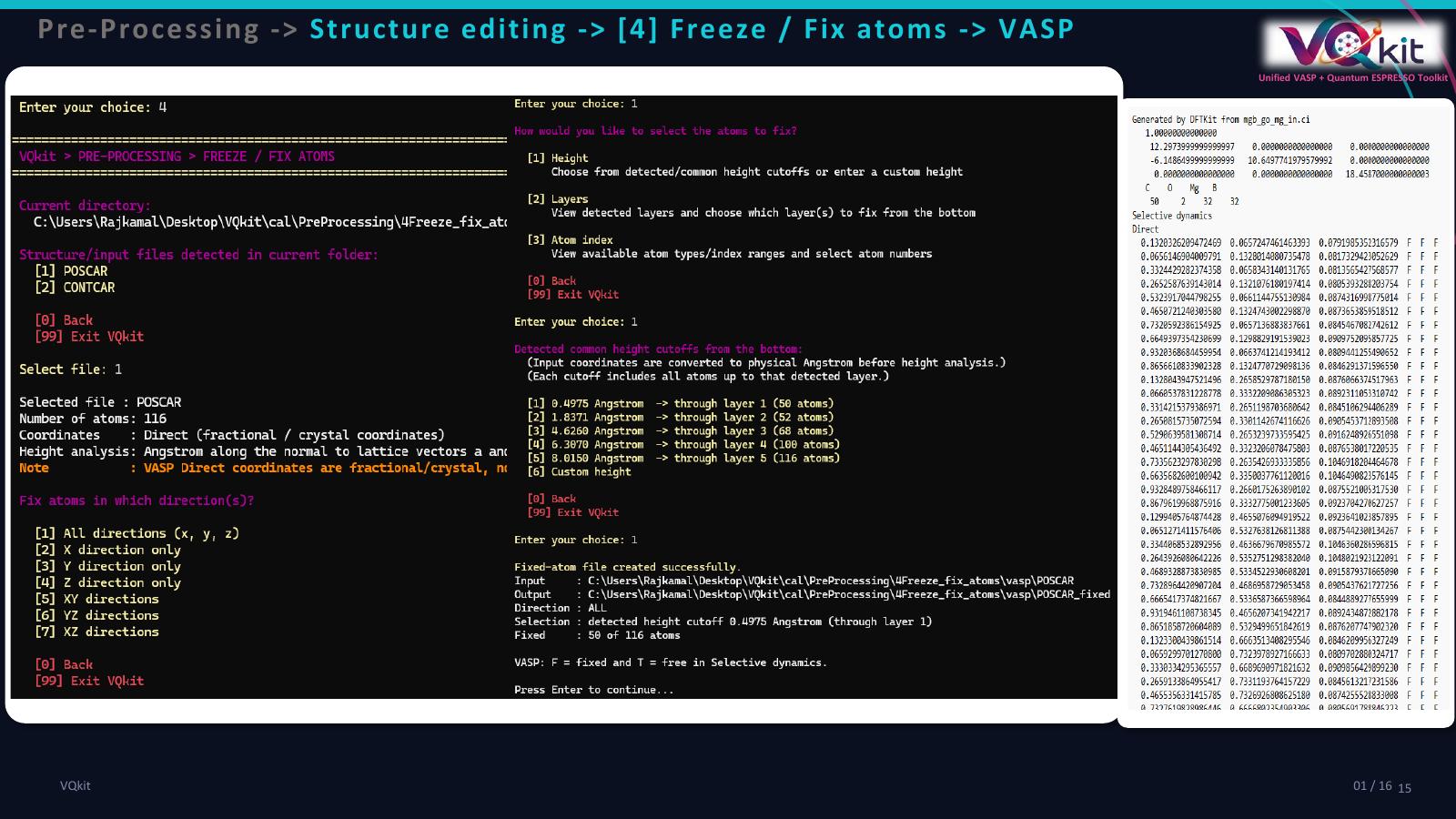
Quantum ESPRESSO example
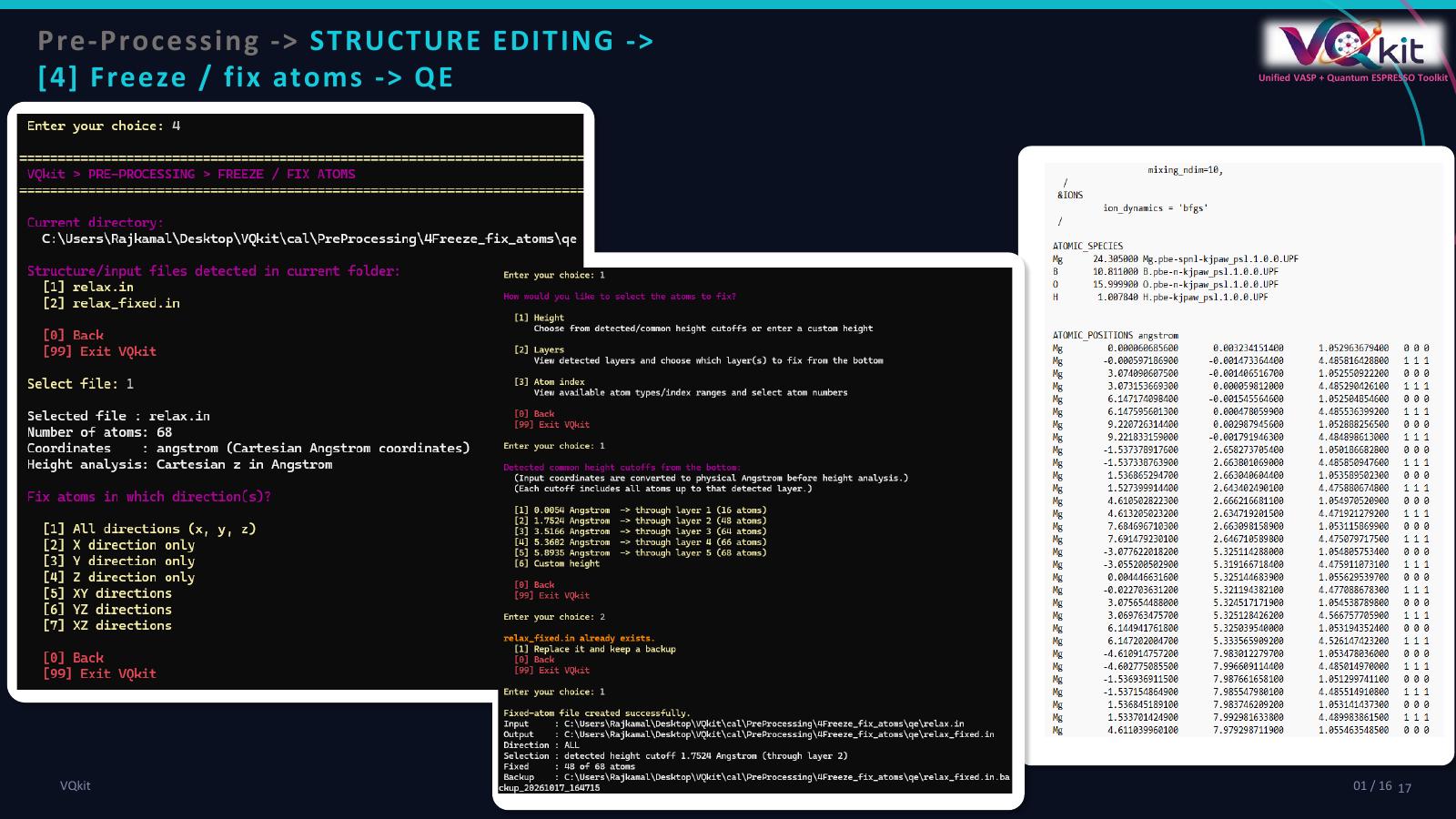
Choose fixed direction
VQkit asks:
Fix atoms in which direction(s)?
The current options are:
[1] All directions (x, y, z)
[2] X direction only
[3] Y direction only
[4] Z direction only
[5] XY directions
[6] YZ directions
[7] XZ directions
Examples
Fix an atom completely:
all
Fix only z motion:
z
This means the atom is prevented from moving along z but remains free along x and y.
Fix x and y:
xy
This allows only motion along z.
How VQkit represents constraints
VASP
VASP Selective Dynamics uses:
T = free
F = fixed
For example:
0.000000 0.000000 0.000000 F F F
means fixed in all directions.
Example:
0.000000 0.000000 0.000000 T T F
means free in x and y, fixed in z.
If the original POSCAR does not contain:
Selective dynamics
VQkit inserts it automatically.
Existing valid T/F flags for unselected atoms are preserved.
Quantum ESPRESSO
QE uses three integer movement flags after each atomic position:
1 = free
0 = fixed
For example:
C 0.000000 0.000000 0.000000 0 0 0
means fixed in all directions.
Example:
C 0.000000 0.000000 0.000000 1 1 0
means free in x and y, fixed in z.
Existing valid QE movement flags for unselected atoms are preserved.
Selecting atoms to fix
VQkit currently provides:
[1] Height
[2] Layers
[3] Atom index
Selection by height
Choose:
[1] Height
VQkit detects common height cutoffs measured from the bottom of the structure.
A typical display may look like:
[1] 0.2500 Angstrom  -> through layer 1
[2] 2.1200 Angstrom  -> through layer 2
[3] 4.0500 Angstrom  -> through layer 3
[4] Custom height
Choosing one of the detected cutoffs selects all atoms from the bottom up to that layer.
This is useful for slab calculations where the lower layers should be fixed.
Example
For a four-layer slab, choosing layer-2 cutoff can freeze the bottom two layers while leaving the upper layers free to relax.
Custom height
You can also enter a physical height in Angstrom.
Example:
Custom height from bottom (Angstrom): 3.0
VQkit selects all atoms whose physical height is less than or equal to that cutoff.
Selection by layers
Choose:
[2] Layers
VQkit displays all detected layers:
Layer 1: height 0.0000 Angstrom | atoms 1-4 | type(s): Pt
Layer 2: height 2.2500 Angstrom | atoms 5-8 | type(s): Pt
Layer 3: height 4.5000 Angstrom | atoms 9-12 | type(s): Pt
You may select:
1
or:
1-2
or:
1,3
This gives more control than the cumulative height-cutoff method.
Selection by atom index
Choose:
[3] Atom index
VQkit displays available atom types and their index ranges.
Example:
Pt    : 1-12
O     : 13-14
H     : 15-16
Then enter atom indices such as:
1-8,12,15
VQkit validates that every requested index lies within the valid range.
Output file for freeze/fix workflow
VQkit does not overwrite the original file.
Typical output names are:
VASP
Input:
POSCAR
Output:
POSCAR_fixed
Input:
CONTCAR
Output:
CONTCAR_fixed
Quantum ESPRESSO
Input:
relax.in
Output:
relax_fixed.in
Existing output protection
If the target output file already exists, VQkit asks:
[1] Replace it and keep a backup
[0] Back
[99] Exit VQkit
If replacement is confirmed, the previous output is backed up using a timestamped filename.
QE atom ordering and mapping
When VQkit writes a fixed-atom QE input, it groups atoms according to the
ATOMIC_SPECIES order.
Because this may change the numerical order of atoms compared with the original file, VQkit also writes an atom mapping file.
For example:
relax_fixed_atom_mapping.txt
The mapping includes:
old atom index;
new atom index;
species;
final
if_posflags.
Example mapping content:
Old_index  New_index  Species  if_pos(1) if_pos(2) if_pos(3)
        1          1  Pt              0         0         0
        2          2  Pt              0         0         0
       13         13  O               1         1         1
This file is important when subsequent analysis depends on atom numbering.
Example: freeze bottom two VASP layers
Assume:
POSCAR
contains a four-layer slab.
Step 1
Open:
Pre-processing
Freeze / fix atoms
Step 2
Select:
POSCAR
Step 3
Choose direction:
[1] All directions
Step 4
Choose atom selection:
[2] Layers
Step 5
Enter:
1-2
Step 6
VQkit creates:
POSCAR_fixed
Step 7
Inspect the file and verify that atoms in the bottom two layers contain:
F F F
while free atoms contain:
T T T
or preserve their previous valid flags.
Example: fix only z motion in QE
Suppose:
relax.in
contains a slab.
Step 1
Open:
Pre-processing
Freeze / fix atoms
Step 2
Select:
relax.in
Step 3
Choose:
Z direction only
Step 4
Select the required atoms by:
height;
layers;
atom index.
Step 5
VQkit creates:
relax_fixed.in
Selected atoms will have flags:
1 1 0
meaning free in x/y and fixed in z.
[5] Delete atoms
Choose:
[5] Delete atoms
The delete-atoms workflow uses structure-aware selection similar to the freeze/fix workflow.
Quantum ESPRESSO
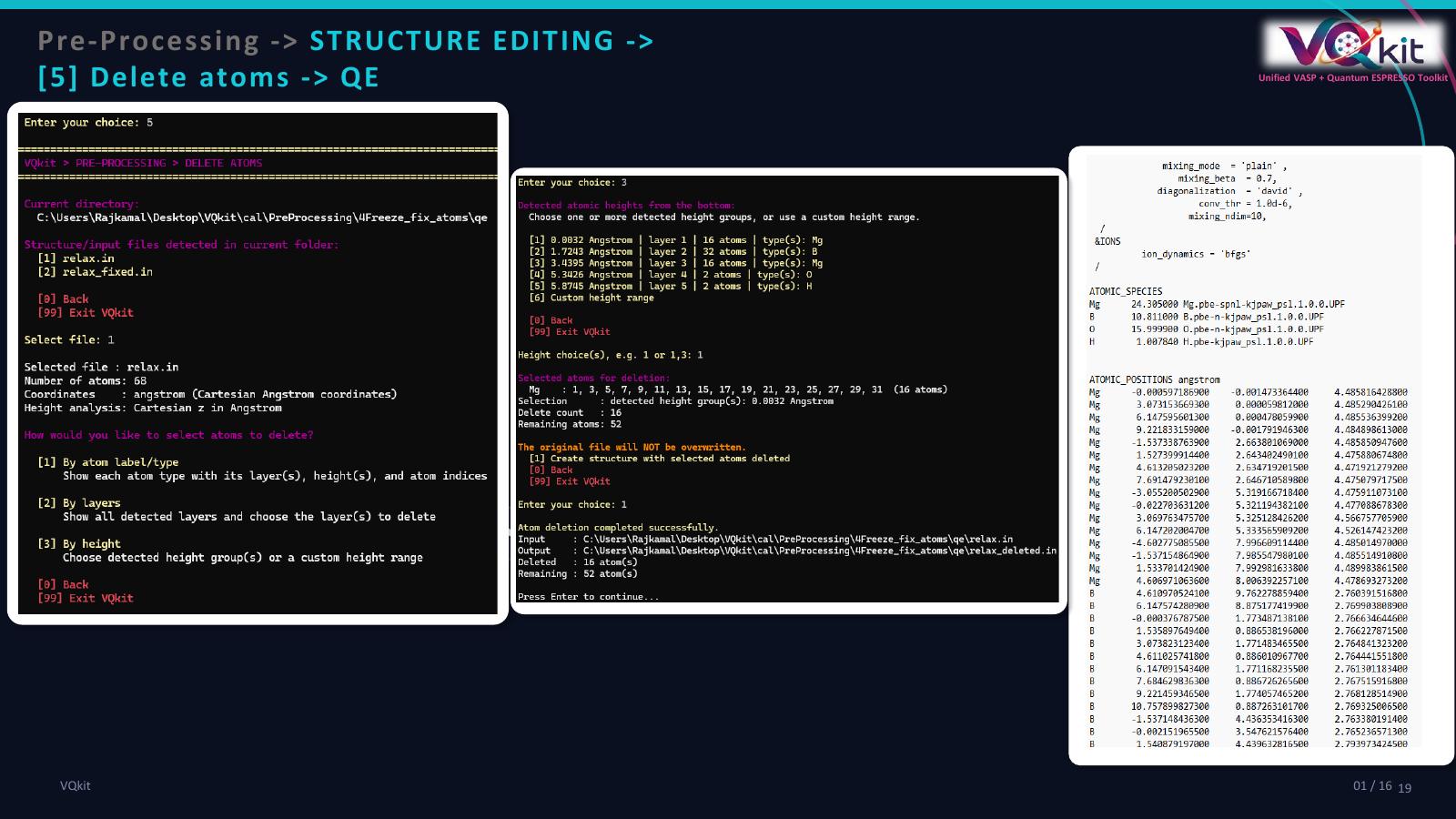
VASP
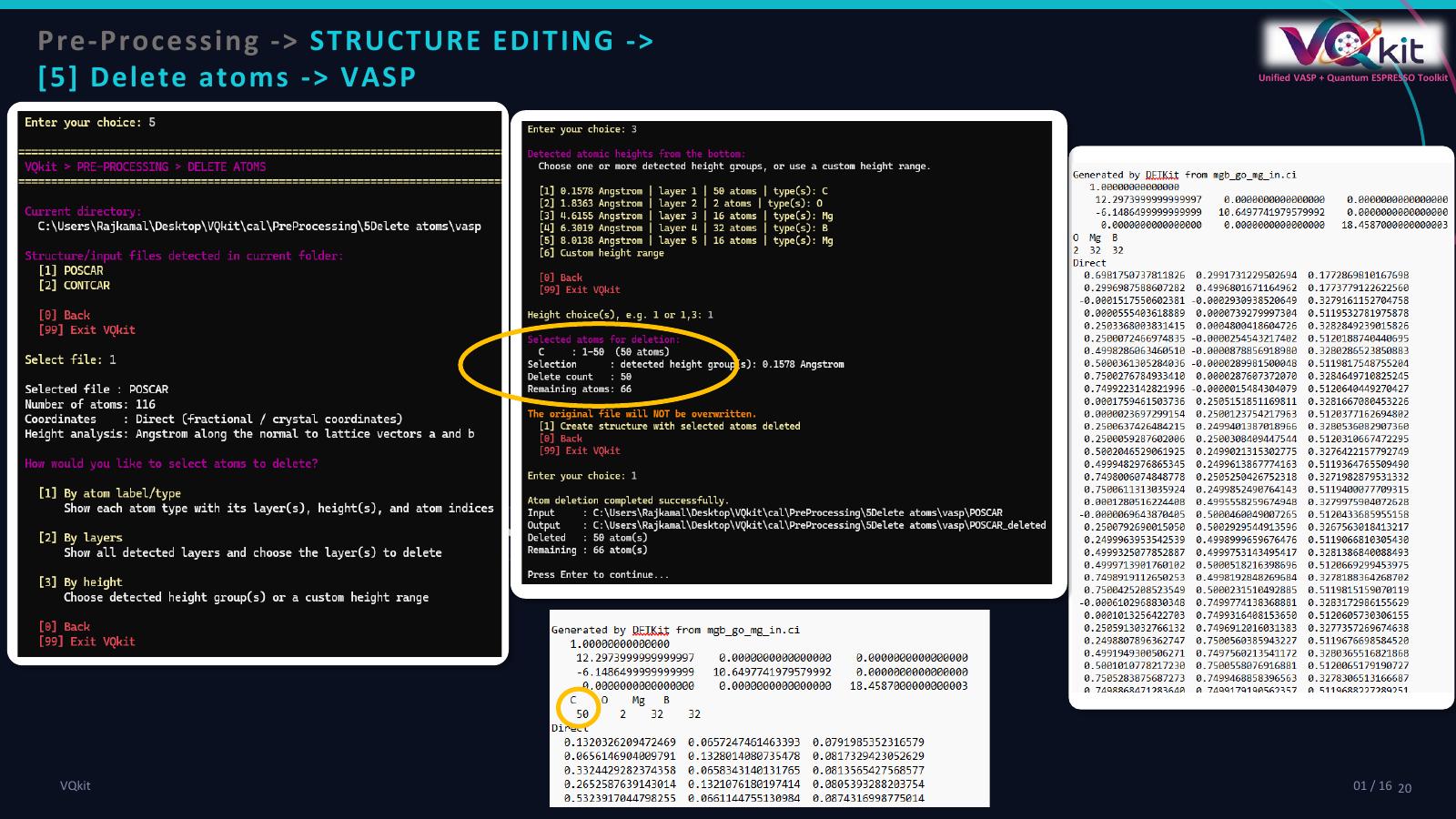
Selecting atoms to delete
The current deletion menu provides:
[1] By atom label/type
[2] By layers
[3] By height
Selection by atom label/type
This option is especially useful when the same element appears in different parts of the structure.
VQkit displays each atom label together with:
number of atoms;
layer numbers;
physical heights;
atom indices.
Example:
Pt  | 12 atoms | layer(s): 1,2,3 | ...
O   |  2 atoms | layer(s): 4     | ...
After choosing an element/type, VQkit displays the layers/heights at which that element occurs.
This helps distinguish, for example:
substrate oxygen;
adsorbate oxygen;
metal atoms in different slab layers.
For a selected label, you can then choose:
one specific layer/height group;
all atoms of that label;
specific atom indices.
Selection by layers
Choose:
[2] By layers
VQkit displays detected layers from bottom to top.
Then enter layer selections such as:
1
2-3
1,4
Only atoms in those selected layers are deleted.
Selection by height
Choose:
[3] By height
Unlike the freeze workflow’s cumulative height cutoff, the delete workflow lets you select:
one or more detected height groups;
a custom height range.
Example custom range:
Minimum height: 6.0
Maximum height: 8.0
Only atoms whose physical heights lie inside that range are selected.
Deletion summary
Before writing the new structure, VQkit displays:
selected species;
selected atom indices;
selection description;
number of atoms to delete;
number of atoms that will remain.
Example:
Selected atoms for deletion:

O     : 13-14  (2 atoms)

Delete count   : 2
Remaining atoms: 12
The original file is not overwritten.
You must explicitly confirm creation of the modified structure.
Delete-atoms output files
Typical output names are:
VASP
POSCAR         -> POSCAR_deleted
CONTCAR        -> CONTCAR_deleted
Quantum ESPRESSO
relax.in       -> relax_deleted.in
scf.in         -> scf_deleted.in
If an output file already exists, VQkit can replace it while preserving a timestamped backup.
VASP deletion behavior
For VASP, VQkit updates:
species counts;
species labels for VASP 5-style POSCAR where necessary;
coordinate block.
The remaining atoms retain their original coordinate lines.
If an entire species is deleted, the corresponding species/count entry is removed in a VASP 5-style structure.
For VASP 4-style files, species labels are unavailable, so only the numerical species slots/counts can be preserved and updated.
Quantum ESPRESSO deletion behavior
For QE, VQkit updates:
nat
ntyp
It also updates:
ATOMIC_POSITIONS
and removes unused entries from:
ATOMIC_SPECIES
when a species no longer occurs after deletion.
Example: remove an adsorbate
Assume a slab contains:
substrate atoms;
one adsorbed O atom at the highest layer.
Step 1
Open:
Pre-processing
Delete atoms
Step 2
Select the structure/input file.
Step 3
Choose:
By atom label/type
Step 4
Select:
O
Step 5
If several oxygen groups exist, choose the group at the adsorbate height.
Step 6
Confirm the selected atom indices.
Step 7
Create the new structure.
For a VASP POSCAR, VQkit writes:
POSCAR_deleted
For QE, it writes a corresponding:
*_deleted.in
Example: remove the top slab layer
Step 1
Choose:
Delete atoms
By layers
Step 2
Inspect the detected layer numbering from bottom to top.
Step 3
Select the highest layer.
For example, if there are four layers:
4
Step 4
Confirm the number and identity of selected atoms.
Step 5
Create the modified structure.
Important scientific checks after editing
Always inspect the generated structure after freezing or deleting atoms.
Check:
atom count;
species count;
atom order;
lattice;
coordinates;
constraints;
charge state;
magnetization;
pseudopotential consistency.
After deletion
If atoms are removed from a structure, you may need to update:
VASP
NELECTif manually set;MAGMOM;atom-index-dependent settings;
Hubbard-U species configuration;
POTCAR if an entire element was removed.
Quantum ESPRESSO
starting magnetization;
Hubbard settings;
constraints;
atomic forces;
occupation-related settings;
any atom-index-dependent input.
Do not assume all unrelated input sections remain physically valid after structure modification.
After freezing
Verify that the chosen constrained atoms represent the intended physical model.
For slab calculations, a common strategy is:
fix one or more bottom layers;
relax the surface and adsorbates.
However, the appropriate number of fixed layers is system-dependent.
Height-based selection cautions
VQkit defines layer height relative to the normal of the first two lattice vectors.
This works naturally for slab cells where:
a and b = surface plane
If the surface plane is defined differently, inspect the detected layers carefully before applying constraints or deletion.
Layer tolerance
The default layer grouping tolerance is approximately:
0.50 Angstrom
Highly buckled layers may therefore be split or merged differently from what you expect.
Always review the displayed layer heights and atom indices.
Recommended workflow
For freezing atoms:
Open
Freeze / fix atoms.Select the structure.
Verify coordinate interpretation.
Choose constrained direction(s).
Select atoms by height, layer, or index.
Create the
*_fixedfile.Inspect the constraints manually.
Run the pre-flight checker before submission.
For deleting atoms:
Open
Delete atoms.Select the structure.
Choose atoms by label, layer, or height.
Review the selected indices and delete count.
Create the
*_deletedstructure.Inspect atom/species counts.
Update calculation-specific settings where necessary.
Run the pre-flight checker.
VQkit automates structure manipulation while preserving the original input file, but the researcher remains responsible for validating the physical meaning of the modified structure.