Reciprocal Space and Convergence
This page explains the VQkit reciprocal-space and convergence tools available under Pre-processing.
The three main workflows are:
[9] Generate band-structure K-path
[10] K-points
[11] Convergence tests
These tools serve different purposes:
Generate band-structure K-pathprepares symmetry-guided high-symmetry paths for band-structure calculations.K-pointsgenerates reciprocal-space sampling meshes for SCF, relaxation, DOS, and related calculations.Convergence testsprepares and analyzes plane-wave cutoff convergence calculations.
The detailed band-structure plotting workflow is documented separately under the Tutorials section. This page focuses on reciprocal-space setup and convergence preparation.
[9] Generate band-structure K-path
Choose:
[9] Generate band-structure K-path
The current VQkit workflow uses:
spglibfor symmetry detection;SeeK-pathfor standardized high-symmetry paths;the HPKOT path convention.
This is the recommended route for production band-path generation.
Supported structure sources
VQkit searches the working directory for readable structures such as:
VASP
POSCAR
CONTCAR
Quantum ESPRESSO
QE *.in files with a valid structure definition.
The QE parser supports both:
explicit
CELL_PARAMETERS;non-zero
ibravwith validA/B/Corcelldm(...)information.
If several structures are found, VQkit asks the user to choose one.
Symmetry tolerance scan
Before generating the path, VQkit performs a symmetry-tolerance scan.
It reports information such as:
Metric lattice hint
spglib symmetry result
space-group symbol
space-group number
for several trial symprec values.
A typical prompt is:
Symmetry tolerance symprec (A) [1e-05]:
VQkit also suggests a tolerance based on the scan.
Why symprec matters
Small structural distortions can reduce the detected symmetry.
For example, a cell may have nearly cubic metrics while the atomic positions cause spglib to classify it as P1.
In such a case VQkit warns that:
the lattice metric suggests higher symmetry;
the atomic arrangement does not satisfy it at the chosen tolerance.
The user should review the structure before accepting the path.
Symmetry-standardized path
The recommended workflow standardizes the structure and generates a canonical high-symmetry path using SeeK-path.
The path is associated with the standardized primitive cell.
This is important because a band path generated for a primitive cell should not be blindly applied to a centered conventional cell.
A conventional cell can produce folded bands.
Interpolation density
VQkit asks:
Interpolated k-points between adjacent symmetry points [20]:
This number refers to the points strictly between the two high-symmetry endpoints.
For example, if you enter:
5
for a segment:
GAMMA -> X
VQkit generates:
GAMMA;
5 interior points;
Therefore the segment contains 7 coordinates in total.
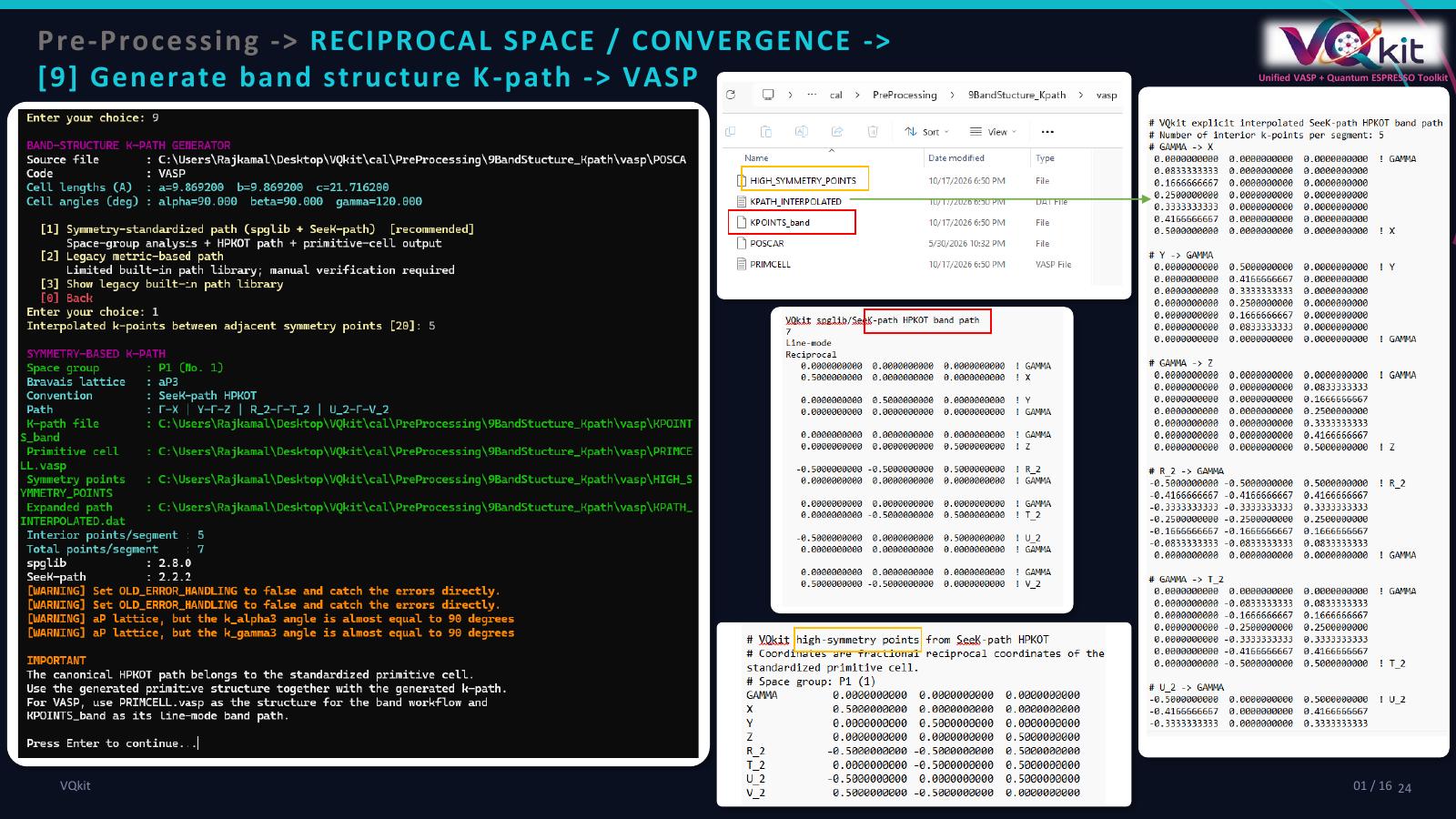
VASP path output
For VASP, VQkit writes:
KPOINTS_band
in line-mode format.
A typical file contains:
Line-mode
Reciprocal
followed by the high-symmetry segment endpoints.
VQkit also writes:
KPATH_INTERPOLATED.dat
containing the explicitly interpolated reciprocal coordinates.
The symmetry-standardization workflow can also provide the standardized primitive structure needed for the path.
Quantum ESPRESSO path output
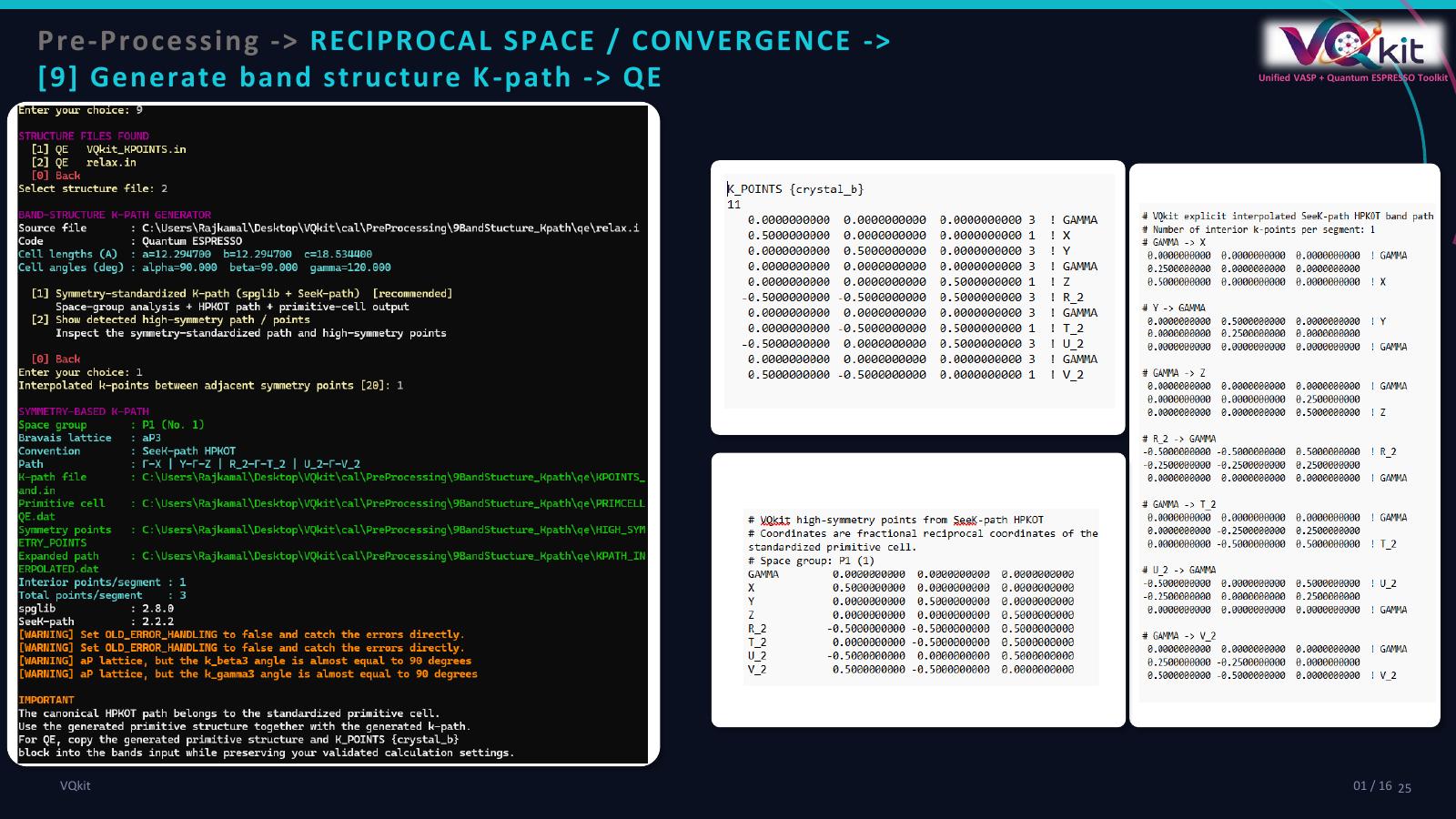
For Quantum ESPRESSO, VQkit writes:
KPOINTS_band.in
using:
K_POINTS {crystal_b}
The generated path includes the correct interpolation weights for connected and disconnected segments.
VQkit also writes:
KPATH_INTERPOLATED.dat
for explicit inspection of the path coordinates.
Built-in fallback path library
VQkit also contains a limited internal high-symmetry path library for common primitive lattice families.
These include:
simple cubic;
primitive FCC;
primitive BCC;
tetragonal;
orthorhombic;
hexagonal.
Examples include:
Simple cubic
GAMMA-X-M-GAMMA-R-X | M-R
Primitive FCC
GAMMA-X-W-K-GAMMA-L-U-W-L-K | U-X
Primitive BCC
GAMMA-H-N-GAMMA-P-H | P-N
Hexagonal
GAMMA-M-K-GAMMA-A-L-H-A | L-M | K-H
This fallback library should not be treated as a substitute for full symmetry standardization for low-symmetry or centered conventional cells.
Band-path cautions
Always check:
the structure used to generate the path;
primitive versus conventional cell;
the detected space group;
symprecsensitivity;the resulting high-symmetry labels;
whether the band calculation uses the matching standardized structure.
For detailed plotting and band-energy analysis, see:
Tutorials -> Band Structure
[10] K-points
Choose:
[10] K-points
VQkit provides four k-mesh modes:
[1] Monkhorst-Pack scheme
[2] Gamma scheme
[3] Irreducible k-points with Gamma scheme
[4] Manual k-point mesh
These are intended for ordinary reciprocal-space sampling rather than band-path calculations.
Supported structures
VQkit reads:
VASP
POSCAR
CONTCAR
Quantum ESPRESSO
QE *.in files containing a readable structure.
For QE, both explicit CELL_PARAMETERS and supported non-zero ibrav
descriptions are accepted.
Reciprocal lattice
VQkit computes reciprocal lattice vectors including the \(2\pi\) factor:
where \(\mathbf{A}\) is the real-space lattice matrix.
The reciprocal vectors are reported in:
1/Angstrom
VQkit also reports:
reciprocal lattice constants;
real-space lattice constants;
selected k-spacing;
detected dimensionality;
estimated vacuum gaps;
final k-mesh.
Automatic k-spacing
For automatic mesh generation, VQkit asks for:
Input the k-spacing value
(in unit of 2*pi/Angstrom) [0.04]:
The guide displayed by VQkit is:
Low    : 0.06 - 0.04
Medium : 0.04 - 0.03
Fine   : 0.02 - 0.01
and notes that:
0.03 - 0.04
is commonly suitable for routine calculations.
These are only practical starting points.
The final k-mesh should be convergence-tested for the target property.
Mesh formula
For each reciprocal direction, VQkit estimates:
where:
\(|\mathbf{b}_i|\) is the reciprocal-vector magnitude;
\(k_{\mathrm{spacing}}\) is entered in units of \(2\pi/\mathrm{\AA}\).
System dimensionality
VQkit asks:
[1] 3D bulk
[2] 2D slab / layer
[3] 1D wire / chain
[4] Auto-detect from atomic vacuum gaps
The default is auto-detection.
Vacuum-gap estimation
VQkit estimates the largest atom-free periodic gap along each lattice coordinate.
The gap is calculated from the fractional atomic coordinates and converted to Angstrom using the corresponding lattice-vector length.
This helps identify non-periodic directions in slabs and wires.
Automatic dimensionality
The current automatic logic treats an atom-free gap of approximately:
5 Angstrom or larger
as a likely vacuum direction.
If:
no vacuum direction is found -> 3D;
one vacuum direction is found -> 2D;
two or more vacuum directions are found -> 1D.
2D systems
For a 2D slab, VQkit forces the non-periodic direction to:
1
k point.
If auto is selected, the direction with the largest detected vacuum gap is used.
You may override it by choosing:
a
b
c
as the non-periodic axis.
Example:
8 8 1
for a slab normal to c.
1D systems
For a wire or chain, VQkit keeps only one periodic direction sampled.
The other two directions are forced to:
1
If auto is selected, VQkit uses the direction with the smallest vacuum gap as the likely periodic axis.
Example:
1 1 12
for a chain periodic along c.
3D systems
For 3D bulk systems, all three reciprocal directions are sampled using the k-spacing rule.
VQkit does not force odd mesh counts merely because a Gamma-centered shift is used.
Monkhorst-Pack mesh
Choose:
[1] Monkhorst-Pack scheme
VQkit calculates the dimensional mesh and writes the appropriate input.
For VASP the output is:
KPOINTS
For QE the generated input is written to:
VQkit_KPOINTS.in
when an existing QE input is being modified.
Gamma-centered mesh
Choose:
[2] Gamma scheme
The mesh dimensions are computed in the same way, but the Gamma-centered scheme is written.
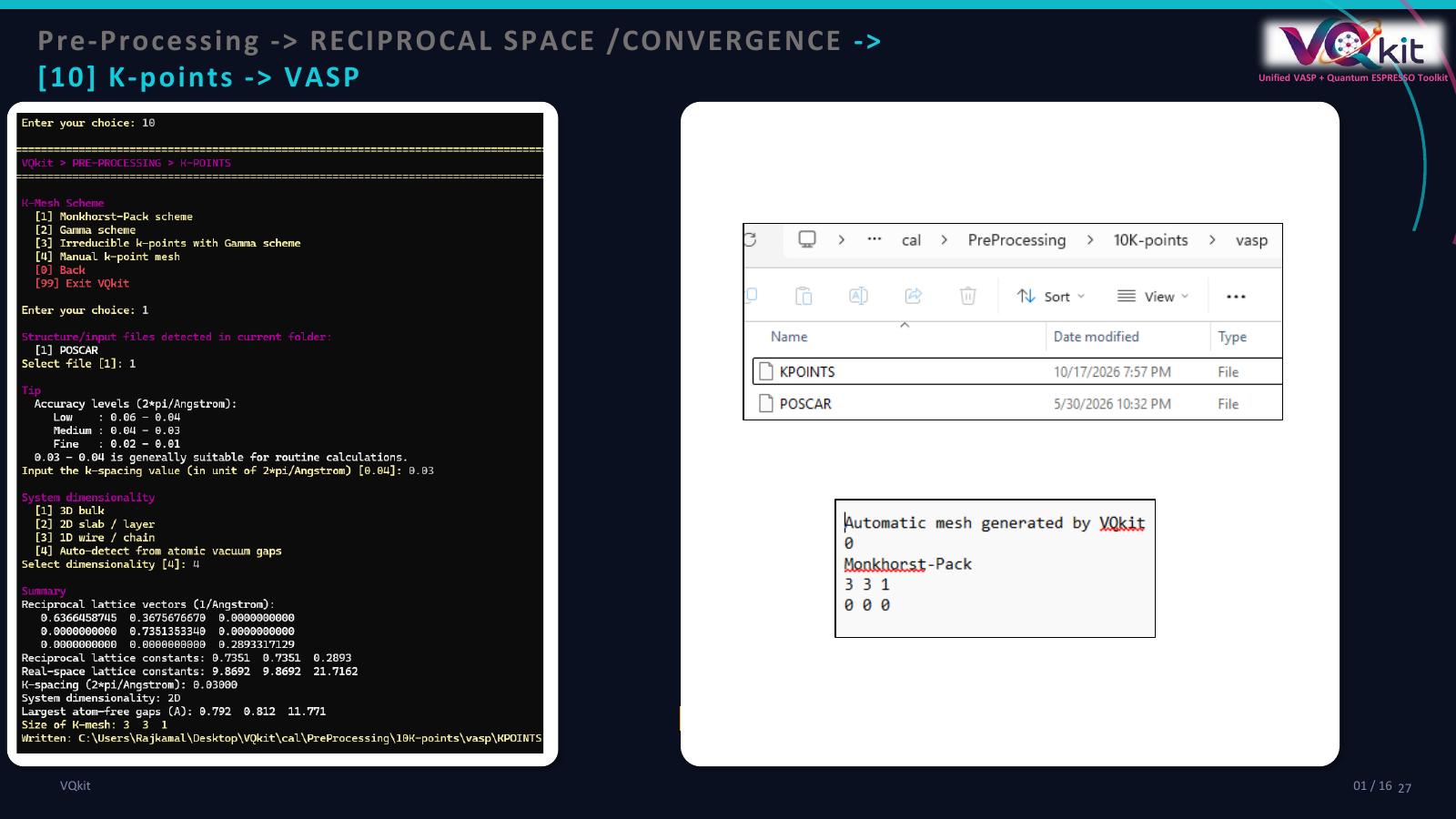
VASP output
A typical file looks like:
Automatic mesh generated by VQkit
0
Gamma
8 8 1
0 0 0
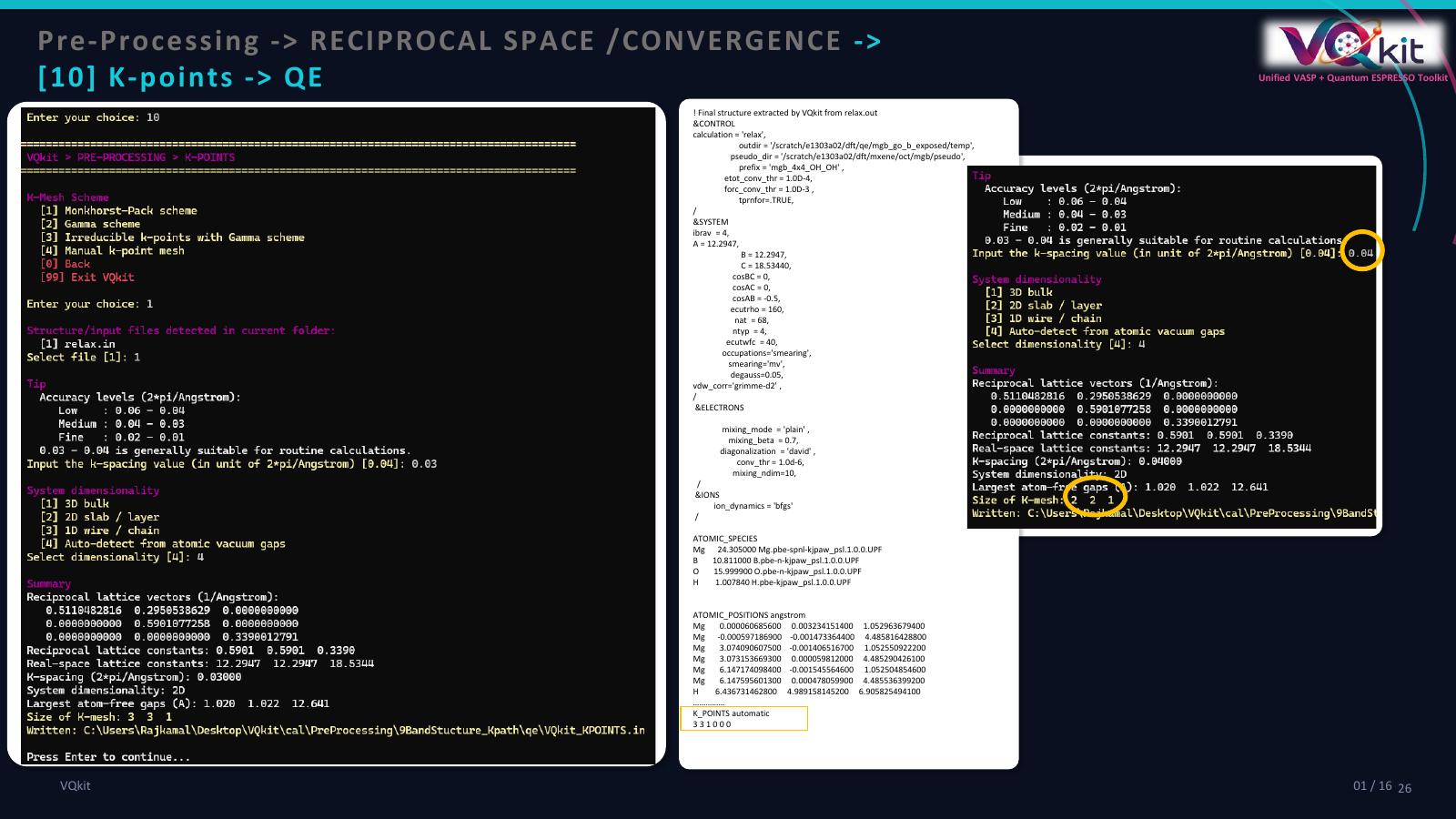
Quantum ESPRESSO output
QE uses:
K_POINTS automatic
nk1 nk2 nk3 sk1 sk2 sk3
For Gamma sampling, the shifts are:
0 0 0
QE Monkhorst-Pack shifts
For the QE Monkhorst-Pack option, VQkit uses a shift of 1 only for
directions with:
mesh size greater than 1;
even mesh count.
Otherwise the shift is 0.
For example:
mesh = 8 8 1
may produce:
K_POINTS automatic
8 8 1 1 1 0
Irreducible k-points
Choose:
[3] Irreducible k-points with Gamma scheme
This option requires:
spglib
VQkit generates the full reciprocal mesh and reduces it by symmetry using
spglib.get_ir_reciprocal_mesh.
The resulting points include symmetry weights.
VASP
VQkit writes an explicit reciprocal-point list to:
KPOINTS
Quantum ESPRESSO
VQkit writes:
K_POINTS_VQkit.in
using:
K_POINTS crystal
with explicit k-point weights.
Manual k-point mesh
Choose:
[4] Manual k-point mesh
VQkit asks:
Enter k-point mesh (kx ky kz):
Example:
6 6 1
Then choose:
Gamma
Monkhorst-Pack
The specified mesh is written directly without k-spacing estimation.
K-point scientific cautions
Mesh density
The automatically generated mesh is a starting estimate.
Converge the mesh for the property of interest.
Metals
Metallic systems may require denser k sampling than insulating systems of similar size.
DOS
Density-of-states calculations commonly require denser k meshes than geometry optimization.
Low-dimensional systems
For slabs and wires, ensure the non-periodic directions are sampled only as needed.
A dense mesh along a vacuum direction is normally unnecessary.
Supercells
As the real-space cell becomes larger, the reciprocal cell becomes smaller, so fewer k points may be required.
Always converge rather than relying solely on cell-size intuition.
[11] Convergence tests
Choose:
[11] Convergence tests
The current VQkit implementation provides cutoff-energy convergence for:
VASP
ENCUT;QE
ecutwfc/ecutrho.
The convergence menu contains:
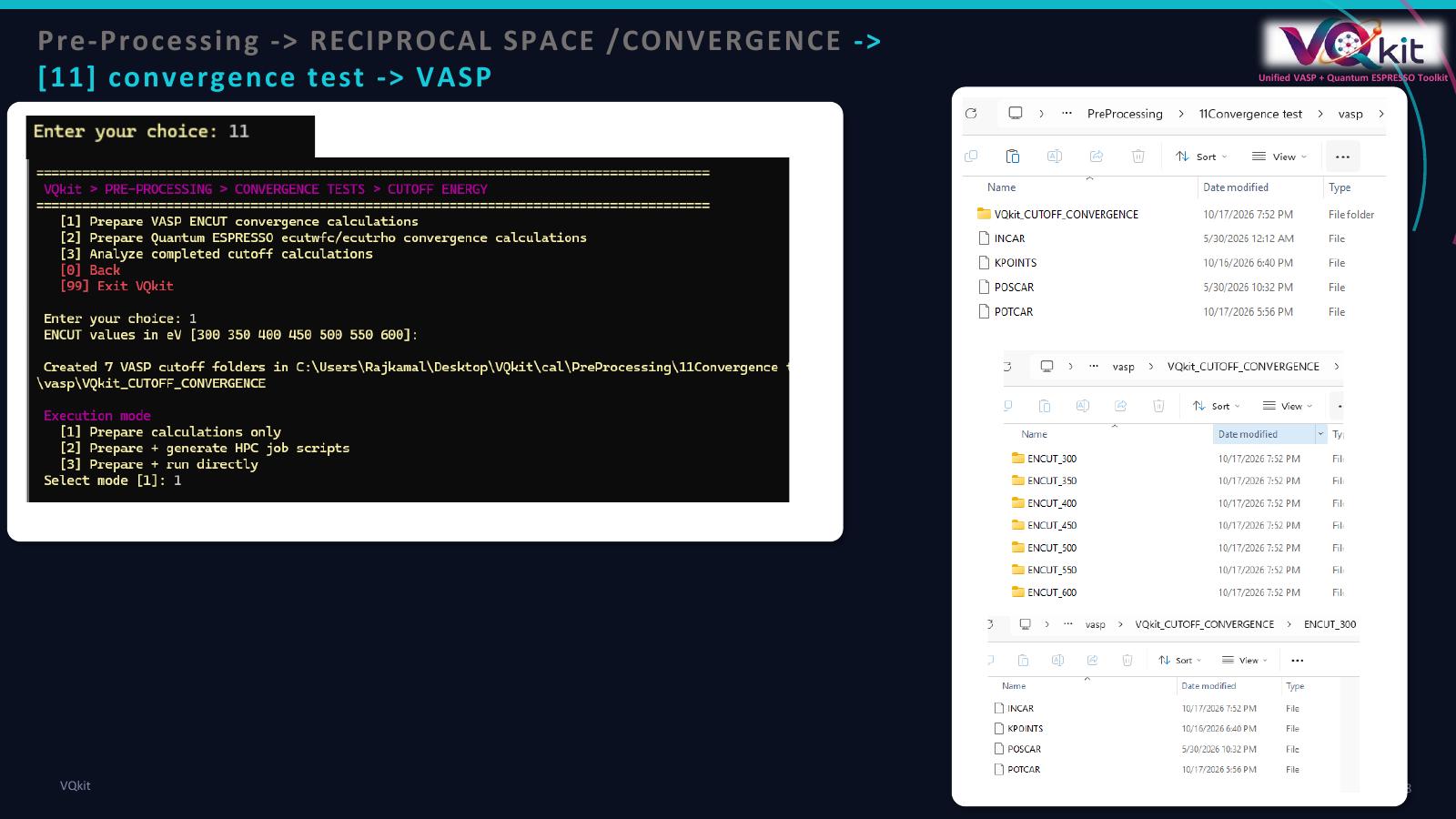
[1] Prepare VASP ENCUT convergence calculations
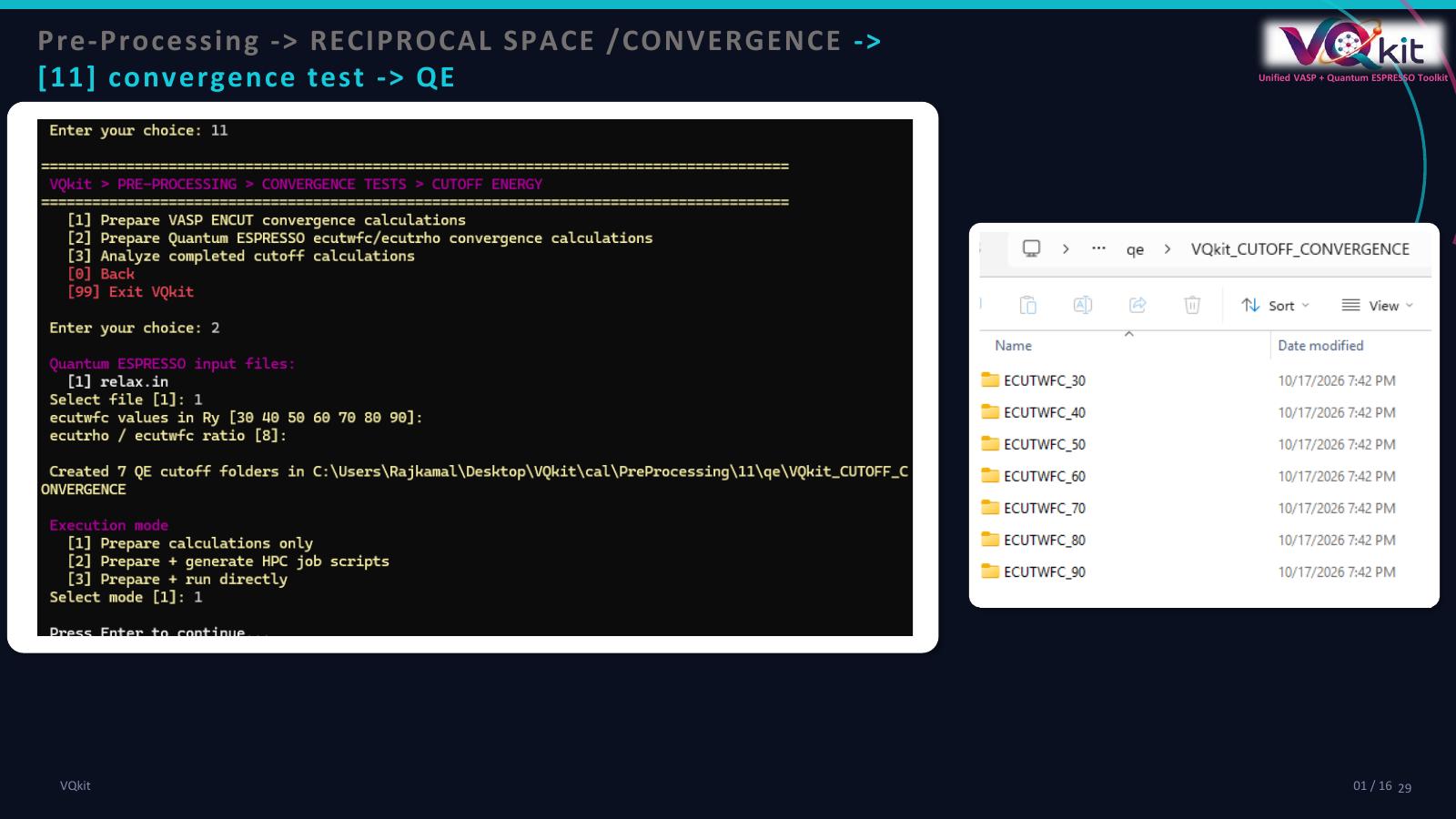
[2] Prepare Quantum ESPRESSO ecutwfc/ecutrho convergence calculations
[3] Analyze completed cutoff calculations
VASP cutoff preparation
Choose:
[1] Prepare VASP ENCUT convergence calculations
Required files
The working directory must contain:
INCAR
POSCAR
POTCAR
KPOINTS
If any are missing, VQkit stops and reports the missing file.
Cutoff values
The default values are:
300 350 400 450 500 550 600
in eV.
You may enter your own positive values.
For example:
350 400 450 500 550
Output directory
VQkit creates:
VQkit_CUTOFF_CONVERGENCE/
Inside it, subdirectories are named according to the cutoff.
Example:
VQkit_CUTOFF_CONVERGENCE/
├── ENCUT_350/
├── ENCUT_400/
├── ENCUT_450/
├── ENCUT_500/
└── ENCUT_550/
Each directory receives a copy of:
INCAR
POSCAR
POTCAR
KPOINTS
The copied INCAR is modified so that:
ENCUT = value
matches the directory.
Quantum ESPRESSO cutoff preparation
Choose:
[2] Prepare Quantum ESPRESSO ecutwfc/ecutrho convergence calculations
VQkit first lists available QE *.in files and asks you to choose one.
Default ecutwfc values
The default values are:
30 40 50 60 70 80 90
in Ry.
ecutrho ratio
VQkit asks:
ecutrho / ecutwfc ratio [8]:
The default is:
8
For each ecutwfc value:
For example:
ecutwfc = 50 Ry
ratio   = 8
gives:
ecutrho = 400 Ry
The appropriate ratio depends on the pseudopotential type and should be reviewed scientifically.
Output structure
VQkit creates:
VQkit_CUTOFF_CONVERGENCE/
with subdirectories such as:
ECUTWFC_30/
ECUTWFC_40/
ECUTWFC_50/
ECUTWFC_60/
Each directory receives a modified copy of the selected QE input.
Local *.UPF files in the starting directory are also copied into the
created folders when present.
Execution modes
After preparing cutoff folders, VQkit offers:
[1] Prepare calculations only
[2] Prepare + generate HPC job scripts
[3] Prepare + run directly
Prepare only
This creates all input directories but does not execute calculations.
This is the safest option when calculations will be submitted manually to an HPC system.
Generate HPC scripts
VQkit can create:
run_cutoff.slurm
inside each convergence folder.
The default VASP command is:
vasp_std > vasp.out
The default QE command is:
pw.x -in scf.in > scf.out
or the selected QE input filename.
The generated script intentionally contains only minimal SLURM information.
Users must review:
partition;
nodes;
tasks;
wall time;
modules;
MPI launcher;
code executable.
before submission.
Run directly
VQkit can also execute the folders sequentially using a user-confirmed command.
The program asks for explicit confirmation before running.
For HPC production work, manually reviewed scheduler scripts are generally preferable.
Analyze completed cutoff calculations
Choose:
[3] Analyze completed cutoff calculations
VQkit asks for:
code: VASP or QE;
convergence root directory if needed;
number of atoms if not detected automatically;
convergence tolerance in meV/atom.
The default tolerance is:
1 meV/atom
Energy extraction
VASP
VQkit reads the final:
free energy TOTEN
from:
OUTCAR
vasp.out
Quantum ESPRESSO
VQkit reads the final:
! total energy = ... Ry
from QE output files.
QE energies are converted using:
Reference energy
The highest-cutoff calculation is used as the reference.
For each cutoff:
The result is converted to:
meV/atom
Recommended cutoff logic
VQkit scans the cutoff values from low to high.
A cutoff is considered recommended if:
its energy difference is within the selected tolerance;
every higher cutoff is also within the same tolerance.
For a tolerance:
1 meV/atom
the first cutoff satisfying this condition is reported.
If no cutoff satisfies the condition:
Recommended cutoff: not converged within requested tolerance
is reported.
Generated convergence outputs
VQkit writes:
VQkit_CUTOFF_CONVERGENCE.dat
VQkit_CUTOFF_CONVERGENCE_summary.txt
VQkit_CUTOFF_CONVERGENCE.png
VQkit_CUTOFF_CONVERGENCE.pdf
The data file contains:
cutoff
total_energy_eV
energy_per_atom_eV
delta_to_highest_meV_per_atom
The summary includes:
atom count;
convergence tolerance;
highest-cutoff reference;
recommended cutoff.
The plot shows:
Total energy / atom
as a function of cutoff energy.
Example: VASP cutoff convergence
Assume the starting directory contains:
INCAR
POSCAR
POTCAR
KPOINTS
Step 1
Open:
Pre-processing
Convergence tests
Prepare VASP ENCUT convergence calculations
Step 2
Enter:
350 400 450 500 550 600
Step 3
Choose:
Prepare calculations only
Step 4
Run all generated ENCUT_* calculations using the same computational
settings except for ENCUT.
Step 5
Return to:
Analyze completed cutoff calculations
Step 6
Choose:
VASP
Step 7
Use a tolerance such as:
1 meV/atom
Step 8
Inspect:
VQkit_CUTOFF_CONVERGENCE_summary.txt
VQkit_CUTOFF_CONVERGENCE.png
Example: QE cutoff convergence
Step 1
Prepare a converged structural input.
Step 2
Open:
Pre-processing
Convergence tests
Prepare Quantum ESPRESSO ecutwfc/ecutrho convergence calculations
Step 3
Select the QE input.
Step 4
Enter:
30 40 50 60 70 80
Step 5
Enter the desired:
ecutrho / ecutwfc ratio
Step 6
Run all generated folders.
Step 7
Analyze the completed calculations.
Step 8
Inspect the recommended ecutwfc and confirm that the energy is converged.
Convergence-test cautions
Only one parameter at a time
When testing cutoff energy, keep other settings fixed.
Do not simultaneously change:
k-point mesh;
smearing;
pseudopotential;
structure;
spin state.
Otherwise the energy differences cannot be attributed only to the cutoff.
Geometry
Cutoff convergence is commonly evaluated with a fixed representative structure.
If every cutoff uses a separately relaxed geometry, the comparison can mix basis-set convergence with structural changes.
Pseudopotential dependence
A cutoff converged for one pseudopotential family may not be converged for another.
Converge again when changing pseudopotentials.
Property dependence
Total energy may converge faster or slower than other properties.
Depending on the research goal, also consider convergence of:
forces;
stresses;
adsorption energies;
reaction energies;
band energies;
magnetic moments.
K-point convergence
Cutoff convergence does not replace k-point convergence.
A production calculation should separately test reciprocal-space sampling.
Recommended workflow
For a new system:
Verify the structure.
Choose consistent pseudopotentials.
Run a cutoff convergence test.
Select a converged plane-wave cutoff.
Run a k-point convergence test separately.
Fix both parameters before production calculations.
Use the same converged settings for comparable structures whenever scientifically appropriate.
VQkit automates reciprocal-space setup and cutoff-convergence analysis, but the final choice of k-mesh, band path, and convergence threshold remains a scientific decision.