Pseudopotentials
This page explains how VQkit manages VASP and Quantum ESPRESSO pseudopotentials during calculation setup.
The pseudopotential tools are available from:
[1] Pre-processing
The two main related options are:
[7] Create POTCAR from POSCAR
[8] Pseudopotential library setup
VQkit does not distribute VASP POTCAR files.
For VASP, the user must provide access to a locally licensed VASP pseudopotential library.
For Quantum ESPRESSO, VQkit can register a local directory containing UPF files, subject to the licenses of the individual pseudopotentials.
Why pseudopotential configuration matters
The pseudopotential must be consistent with the calculation.
Important considerations include:
exchange-correlation functional;
valence-electron configuration;
semicore treatment;
relativistic treatment;
spin-orbit calculations;
recommended plane-wave cutoff;
compatibility across all calculations being compared.
A pseudopotential is not selected only by element name.
For some elements, several variants may exist.
For example, a local VASP library may contain directories such as:
Ti
Ti_pv
Ti_sv
These variants can represent different valence configurations.
VQkit therefore does not silently replace an exact element potential with
a _pv or _sv variant.
If several variants are available and no exact element directory is found, VQkit asks the user to choose explicitly.
[8] Pseudopotential library setup
Choose:
[8] Pseudopotential library setup
The current VQkit menu provides:
[1] Configure VASP POTCAR library
[2] Configure Quantum ESPRESSO UPF library
[3] Show configured pseudopotential libraries
[4] Show VQkit private pseudopotential folders
[0] Back
[99] Exit VQkit
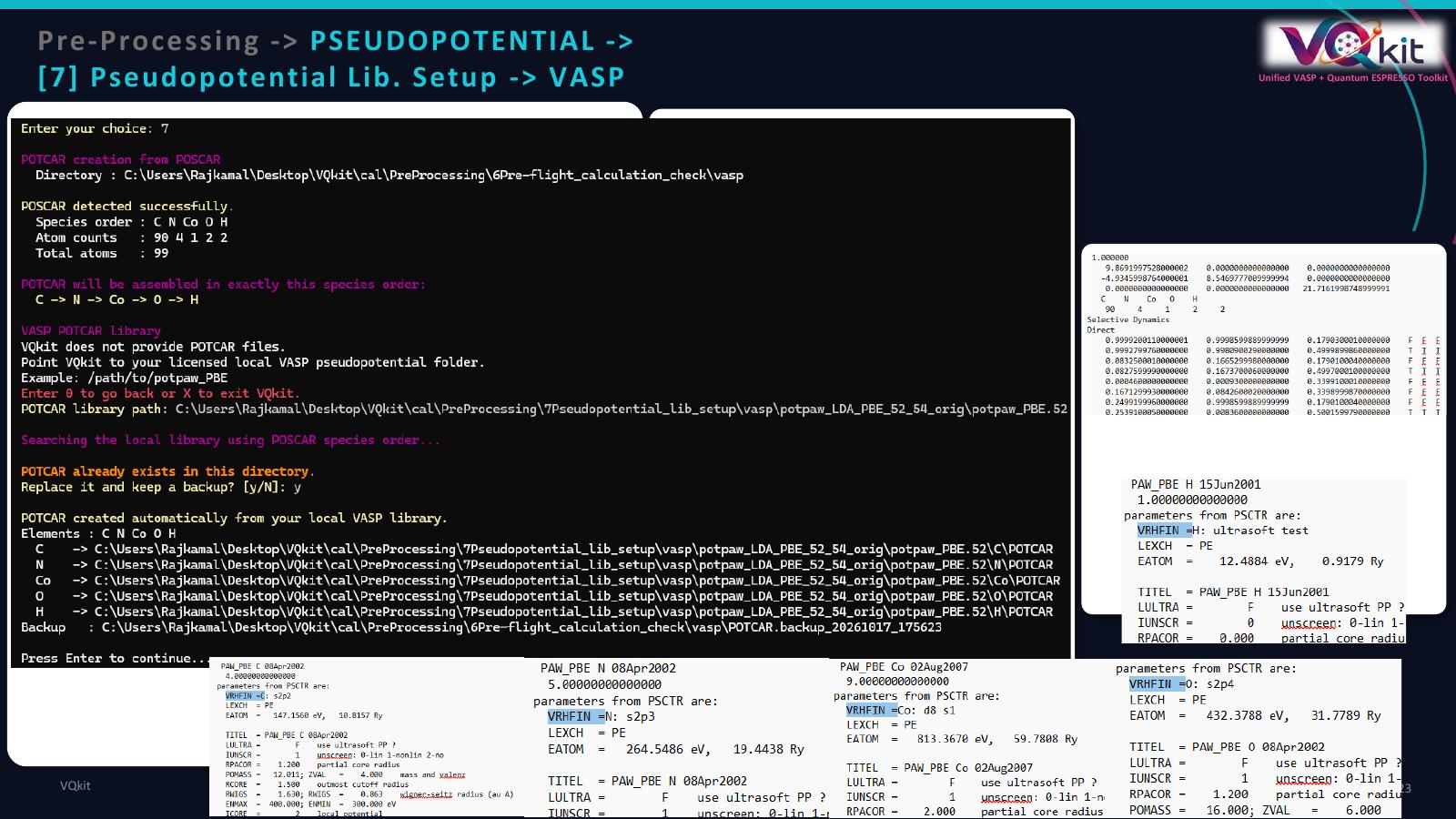
The visual guide below illustrates the library setup workflow.
1. Configure VASP POTCAR library
Choose:
1
VQkit asks for the path to your local VASP pseudopotential library.
Example:
/home/user/vasp/potpaw_PBE
or another licensed local location.
VQkit checks that the directory exists before saving the configuration.
The configured path is then reused by later POTCAR-generation workflows.
How VQkit finds a VASP library
VQkit checks several possible configuration sources.
It first checks environment variables such as:
VQkit_VASP_PP_PATH
VASP_PP_PATH
PMG_VASP_PSP_DIR
If one of these points to a valid directory, VQkit can use it.
If no valid environment-variable path is available, VQkit checks its saved local configuration.
This allows users to configure the library once and reuse it in future sessions.
Typical VASP library layouts
VQkit supports common directory layouts such as:
/library/C/POTCAR
/library/O/POTCAR
/library/Fe/POTCAR
and layouts where the pseudopotential set is one level below the configured root, for example:
/library/potpaw_PBE/C/POTCAR
/library/potpaw_PBE/O/POTCAR
or:
/library/POT_GGA_PAW_PBE/C/POTCAR
VQkit also searches one nested pseudopotential-set directory when locating an element.
Exact element versus variant
Suppose VQkit needs a Ti POTCAR.
If the library contains:
Ti/POTCAR
VQkit selects it directly.
If Ti/POTCAR does not exist but the library contains:
Ti_pv/POTCAR
Ti_sv/POTCAR
VQkit displays a selection menu similar to:
No exact POTCAR folder was found for Ti.
Select the pseudopotential variant explicitly:

  [1] Ti_pv
  [2] Ti_sv

  [0] Back
  [99] Exit VQkit
This prevents VQkit from silently making a scientifically important pseudopotential choice.
2. Configure Quantum ESPRESSO UPF library
Choose:
2
VQkit asks for a directory containing your local Quantum ESPRESSO pseudopotentials.
Example:
/home/user/qe_pseudo
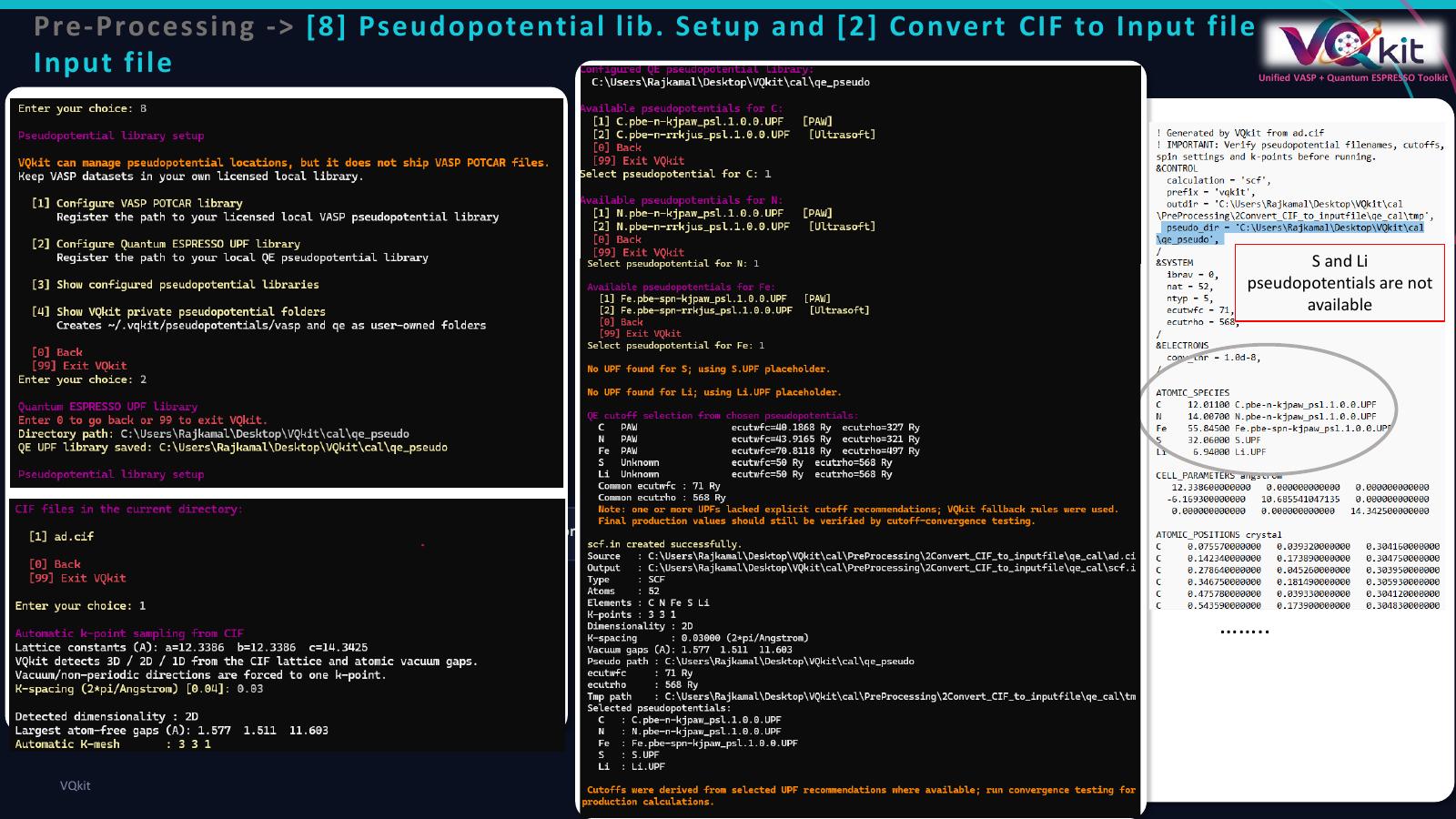
The selected path is stored in VQkit configuration and can be reused by QE input-generation and structure-conversion workflows.
A typical QE pseudopotential folder may contain:
C.pbe-n-kjpaw_psl.1.0.0.UPF
O.pbe-n-kjpaw_psl.1.0.0.UPF
Li.pbe-s-kjpaw_psl.1.0.0.UPF
The exact filenames depend on the pseudopotential source and library.
VQkit does not assume one universal naming convention for UPF files.
QE pseudopotential availability
During QE workflows, VQkit can report when a required pseudopotential is not available.
For example, during CIF-to-QE conversion, the user may be informed that one or more species do not have a configured UPF file.
The missing pseudopotential must then be added to the configured library or the QE input must be edited to reference the correct file.
3. Show configured pseudopotential libraries
Choose:
3
VQkit displays the currently configured paths.
The status includes:
VASP POTCAR library
QE UPF library
VQkit private pseudopotential root
A typical display may look like:
Current pseudopotential configuration

VASP POTCAR library : /home/user/vasp/potpaw_PBE
QE UPF library      : /home/user/qe_pseudo
Private VQkit root  : /home/user/.vqkit/pseudopotentials
This option is useful when troubleshooting a calculation that cannot locate a required potential.
4. VQkit private pseudopotential folders
Choose:
4
VQkit creates user-owned directories under:
~/.vqkit/pseudopotentials/
The directory structure is:
~/.vqkit/pseudopotentials/
├── vasp/
├── qe/
└── README.txt
These folders are convenience locations only.
VQkit does not populate them with restricted VASP datasets.
The VASP directory may be used by a licensed user to organize or link their own local pseudopotential files.
The QE directory may be used for UPF files when the individual pseudopotential licenses permit local storage and use.
VASP licensing note
VASP POTCAR datasets are licensed material.
VQkit therefore:
does not ship POTCAR files;
does not download POTCAR files automatically;
does not embed VASP PAW datasets in the package;
only locates and concatenates files from the user’s own local licensed library.
This design allows VQkit to automate POTCAR assembly without redistributing restricted VASP data.
[7] Create POTCAR from POSCAR
Choose:
[7] Create POTCAR from POSCAR
This workflow creates a VASP POTCAR in exactly the species order found in
POSCAR.
Required file
The current working directory must contain:
POSCAR
If POSCAR is missing, VQkit stops and reports:
POSCAR was not found in the current directory.
Insert the structure file and run the option again.
Reading species information
VQkit reads:
element order;
atom counts;
total atom count.
For example, if POSCAR contains:
Fe O
2 3
VQkit reports:
Species order : Fe O
Atom counts   : 2 3
Total atoms   : 5
and states that POTCAR will be assembled in the order:
Fe -> O
The species order is important because VASP expects the POTCAR datasets to correspond to the POSCAR element order.
Using a previously configured library
If a VASP library has already been configured, VQkit displays it and asks:
[1] Use this library
[2] Choose another library
[0] Back
[99] Exit VQkit
Pressing Enter or choosing:
1
uses the configured library.
Choose:
2
to register a different local library for the current setup.
POTCAR assembly
For every species in POSCAR, VQkit searches the local library.
If exact element folders are found, the corresponding POTCAR files are concatenated in POSCAR species order.
For example:
POSCAR species order:
Fe O
may result in:
Fe -> /library/Fe/POTCAR
O  -> /library/O/POTCAR
The final file is written as:
POTCAR
in the current calculation directory.
Missing potential
If VQkit cannot find a POTCAR for one of the required species, it stops the entire assembly.
Example:
Could not find a POTCAR for element Nb under:
  /home/user/vasp/potpaw_PBE

POTCAR was not created.
This prevents an incomplete POTCAR from being produced.
Existing POTCAR
If a POTCAR already exists, VQkit does not overwrite it silently.
It asks:
POTCAR already exists in this directory.
Replace it and keep a backup? [y/N]:
If the user answers y, VQkit creates a timestamped backup such as:
POTCAR.backup_20261023_140500
before generating the new POTCAR.
If the user answers N or presses Enter, the existing POTCAR is left
unchanged.
Automatic POTCAR creation during calculation setup
During the interactive VASP calculation-creation workflow, VQkit can also wait for a POSCAR to be inserted.
If POSCAR is not yet present, it displays a message similar to:
POSCAR is not inserted.

Please insert your POSCAR as:
  /path/to/calculation/POSCAR

After inserting POSCAR, press Enter to continue.

[0] Back
[99] Exit VQkit
After POSCAR is detected, VQkit reads the elements and can assemble POTCAR automatically from the configured local library.
Example: VASP Fe-O calculation
Assume the calculation directory contains:
POSCAR
with:
Fe O
2 3
and the configured library is:
/home/user/vasp/potpaw_PBE
Step 1 — Open Pre-processing
Choose:
[1] Pre-processing
Step 2 — Create POTCAR
Choose:
[7] Create POTCAR from POSCAR
Step 3 — Confirm detected species
VQkit should report:
Species order : Fe O
Atom counts   : 2 3
Step 4 — Select the local library
Choose the configured VASP library.
Step 5 — Resolve variants if necessary
If VQkit finds multiple valid variants, select the desired potential explicitly.
Step 6 — Inspect the result
Confirm that:
POTCAR
has been created.
VQkit also prints the source path used for every species.
Step 7 — Run pre-flight validation
Use:
Pre-processing
Pre-flight calculation check
The pre-flight checker can verify that the POTCAR species order matches the POSCAR element order.
It can also compare ENCUT in INCAR with the maximum ENMAX value found
in POTCAR.
POTCAR and ENCUT
The VASP pseudopotential contains a recommended ENMAX.
During pre-flight validation, VQkit can compare:
INCAR ENCUT
with:
maximum POTCAR ENMAX
If:
VQkit reports a warning.
This is a useful automated consistency check, but it does not replace systematic cutoff convergence testing.
Example: Quantum ESPRESSO library setup
Assume your UPF files are stored in:
/home/user/qe_pseudo
Step 1 — Open library setup
Choose:
Pre-processing
Pseudopotential library setup
Step 2 — Select QE
Choose:
[2] Configure Quantum ESPRESSO UPF library
Step 3 — Enter the path
Enter:
/home/user/qe_pseudo
Step 4 — Verify status
Choose:
[3] Show configured pseudopotential libraries
Confirm that VQkit reports the expected QE UPF directory.
Step 5 — Use it in QE setup
When preparing a QE calculation, verify that the ATOMIC_SPECIES block
uses filenames that actually exist in the configured UPF library.
For example:
ATOMIC_SPECIES
  C   12.011   C.pbe-n-kjpaw_psl.1.0.0.UPF
  O   15.999   O.pbe-n-kjpaw_psl.1.0.0.UPF
Scientific selection of pseudopotentials
VQkit can locate pseudopotentials, but it does not decide which scientific variant is best for a particular study.
The user should consider the following.
Exchange-correlation functional
Use pseudopotentials compatible with the functional used in the calculation.
For example, do not casually mix pseudopotentials generated for different exchange-correlation approximations.
Valence configuration
Some systems require semicore states to be treated explicitly.
This is one reason variants such as _pv and _sv exist in VASP
libraries.
The appropriate choice depends on the chemistry and target property.
Spin-orbit coupling
Heavy elements and SOC calculations may require appropriate relativistic pseudopotentials.
Consistency across comparative calculations
When comparing several structures or catalysts, use a consistent pseudopotential family unless there is a justified scientific reason not to.
Cutoff convergence
The recommended cutoff in the pseudopotential is a starting point.
Converge the plane-wave cutoff for the property being calculated.
Common problems
VASP library not configured
If VQkit cannot find a VASP pseudopotential library, configure it through:
Pre-processing
Pseudopotential library setup
Configure VASP POTCAR library
Wrong directory level
If a valid library exists but VQkit cannot locate individual species, verify that the configured root contains or leads to folders of the form:
Element/POTCAR
or a supported pseudopotential-set directory containing those folders.
POTCAR variant not selected
If only _pv or _sv variants are available, VQkit requires an explicit
selection.
This is intentional.
Missing QE UPF file
If a QE calculation references a UPF filename that is not present in the configured library, either:
add the required licensed/open pseudopotential file;
choose another appropriate pseudopotential;
update the QE input filename.
POSCAR species order changed
If the POSCAR species order changes, regenerate POTCAR.
Do not reuse an old POTCAR unless its internal dataset order still matches POSCAR exactly.
Existing POTCAR overwritten unintentionally
VQkit protects an existing POTCAR by asking for confirmation and creating a backup before replacement.
Licensing and redistribution
VASP
VQkit does not distribute VASP POTCAR datasets.
Users must obtain and use VASP pseudopotentials according to their VASP license.
Quantum ESPRESSO
QE itself is open source, but individual pseudopotential datasets may have their own licenses and redistribution conditions.
Check the license of the specific UPF library being used.
Recommended workflow
For VASP:
Configure your licensed local POTCAR library.
Prepare POSCAR.
Run
Create POTCAR from POSCAR.Confirm the detected species order.
Explicitly select variants where necessary.
Inspect the source POTCAR paths reported by VQkit.
Run the pre-flight check.
Converge ENCUT for the target calculation.
For Quantum ESPRESSO:
Configure a local UPF library.
Prepare the QE input.
Verify every
ATOMIC_SPECIESfilename.Confirm all referenced UPF files exist.
Review
ecutwfcandecutrhorecommendations.Run the pre-flight check.
Perform cutoff convergence testing.
VQkit automates library management, POTCAR assembly, file checks, and consistency checks, while leaving the scientific choice of pseudopotential to the researcher.